
Product Introduction
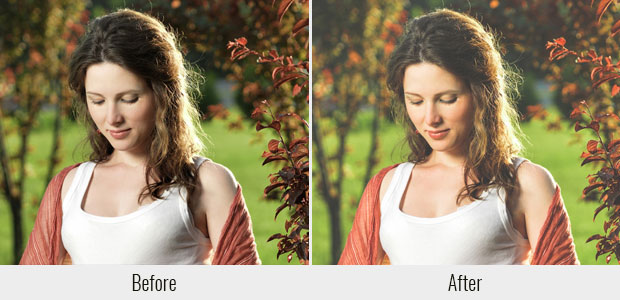
📸 Elevate your photography with our professional Lightroom preset collection, carefully crafted to help you achieve stunning, consistent results across all your images. This preset is designed to enhance the natural beauty of your photos while maintaining a professional, polished look. Whether you’re a professional photographer shooting weddings, portraits, landscapes, or travel adventures, or a hobbyist looking to make your everyday photos look extraordinary, this preset will transform your images with just one click. The preset intelligently adjusts exposure, white balance, contrast, highlights, shadows, and color tones to create a harmonious, eye-catching aesthetic. Each preset is fully adjustable, allowing you to fine-tune the intensity to match your specific vision and shooting conditions.
📦 What’s Included:
- ✅ 1 professionally crafted Lightroom Preset file (.lrtemplate format)
- 📖 Comprehensive installation instructions for all Lightroom versions
- 🖼️ High-quality before/after sample images to showcase the preset’s effects
- 💡 Helpful tips and tricks for getting the best results with different types of photos
- 📸 Bonus additional presets for extra creative options
📥 How to Get
As soon as your payment is processed successfully, you will receive displayed on the order an instant download link confirmation page. Additionally, a confirmation email containing the download link will be sent to your registered email address. The package includes all preset files organized in a easy-to-navigate folder structure. Simply extract the ZIP file and follow the installation guide to start using the presets immediately. If you encounter any issues finding or downloading your files, our support team is ready to assist you.
🎯 Usage Guide
1. Open Adobe Lightroom Classic CC or Lightroom CC on your computer
2. Go to the Edit menu and select Preferences (Lightroom Classic) or Settings (Lightroom CC)
3. Click on Presets tab and then “Show Presets Folder” to locate your preset directory
4. Create a new folder for your new presets and place the .lrtemplate file inside
5. Return to Lightroom and click the Refresh button in the Presets panel
6. Open the photo you want to edit
7. In the Develop module, navigate to the Presets panel on the left side
8. Click on your newly installed preset to apply it
9. Use the exposure and other sliders to fine-tune the look to your preference
10. Export or save your beautifully enhanced photo
💬 After-Sales
If you encounter any issues during download, installation, or usage, please visit our Contact Us page and reach out to us. We are committed to providing comprehensive support and will respond promptly to help resolve any problems you may experience.